Wednesday, August 14, 2024

Use R to prompt a local LLM with ollamar

This is reposted from the original article: 

https://blog.stephenturner.us/p/use-r-to-prompt-a-local-llm-with

Use R to prompt a local LLM with ollamar: Using R to prompt llama3.1:70b running on my laptop with Ollama + ollamar to tell me what's interesting about a set of genes, and to summarize recent bioRxiv preprints


Subscribe at https://blog.stephenturner.us/ to get future posts like this delivered to your e-mail.

--------------------

I’ve been using the llama3.1:70b model just released by Meta using Ollama running on my MacBook Pro. Ollama makes it easy to talk to a locally running LLM in the terminal (ollama run llama3.1:70b) or via a familiar GUI with the open-webui Docker container.

Here I’ll demonstrate using the ollamar package on CRAN to talk to an LLM running locally on my Mac. I’ll demonstrate this by asking llama3.1-70b what it thinks about a set of genes1 and to summarize recent preprints published on bioRxiv’s Scientific Communication and Education channel using the smaller+faster 8B model.

Tell me what’s interesting about these genes

Genes involved in the G2/M checkpoint

First I’ll use the msigdbr R package to pull the gene symbols for all the genes involved in the G2/M checkpoint in the cell cycle progression from MSigDb.


library(msigdbr)
hm <- msigdbr(species="human", category="H")
gs <- unique(hm[hm$gs_name=="HALLMARK_G2M_CHECKPOINT",]$gene_symbol)

Next, I’ll load the ollamar package, and test the connection to the Ollama server.

library(ollamar)
test_connection()

If all goes well you should see something like the following:

Ollama local server running
<httr2_response>
GET http://localhost:11434/
Status: 200 OK
Content-Type: text/plain
Body: In memory (17 bytes)


The ollamar README has good documentation on how to pull models, list which models you have available, etc.


Next, I’ll collapse the gene symbol vector I created above to a string (“CDK1, SMC2, POLA2, …”), and create a prompt tacking on this list of gene symbols to the end. Finally, I’ll use the generate() function with this prompt I just created to prompt the llama3.1:70b2 model, and print the results.


# Collapse the symbol vector to a string ("GENE1, GENE2, GENE3")
gs_string <- paste(gs, collapse=", ")

# Create a prompt
prompt <- paste("I'm going to give you some gene symbols.
                Anything interesting about this gene set? ",
                gs_string)

# Prompt the model
res <- generate("llama3.1:70b", prompt=prompt, output="text")

# Print the results
cat(res$response)
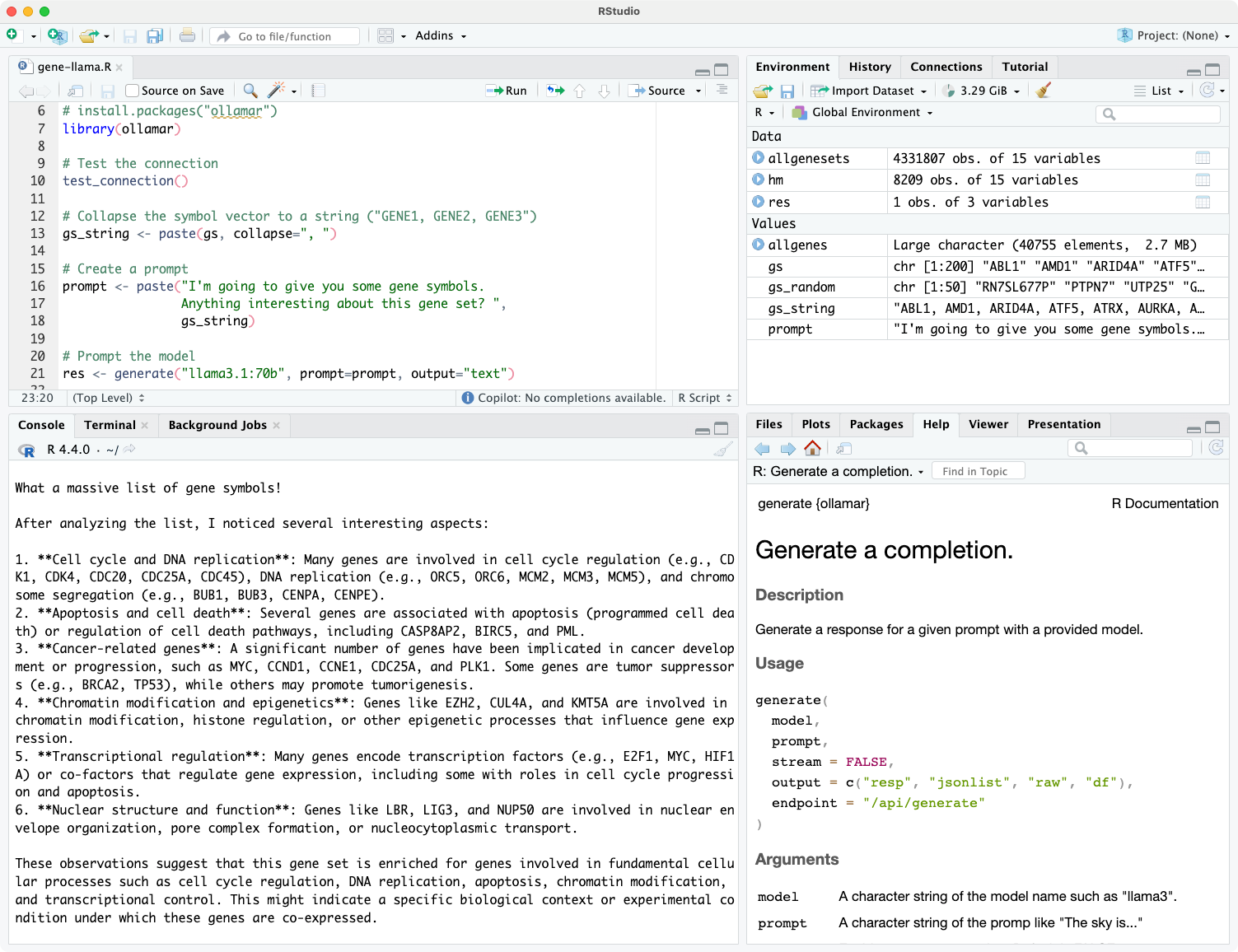

The prompt returns markdown text which looks nice after rendering with RMarkdown/Quarto:

What a massive list of gene symbols!

After analyzing the list, I noticed several interesting aspects:

  1. Cell cycle and DNA replication: Many genes are involved in cell cycle regulation (e.g., CDK1, CDK4, CDC20, CDC25A, CDC45), DNA replication (e.g., ORC5, ORC6, MCM2, MCM3, MCM5), and chromosome segregation (e.g., BUB1, BUB3, CENPA, CENPE).

  2. Apoptosis and cell death: Several genes are associated with apoptosis (programmed cell death) or regulation of cell death pathways, including CASP8AP2, BIRC5, and PML.

  3. Cancer-related genes: A significant number of genes have been implicated in cancer development or progression, such as MYC, CCND1, CCNE1, CDC25A, and PLK1. Some genes are tumor suppressors (e.g., BRCA2, TP53), while others may promote tumorigenesis.

  4. Chromatin modification and epigenetics: Genes like EZH2, CUL4A, and KMT5A are involved in chromatin modification, histone regulation, or other epigenetic processes that influence gene expression.

  5. Transcriptional regulation: Many genes encode transcription factors (e.g., E2F1, MYC, HIF1A) or co-factors that regulate gene expression, including some with roles in cell cycle progression and apoptosis.

  6. Nuclear structure and function: Genes like LBR, LIG3, and NUP50 are involved in nuclear envelope organization, pore complex formation, or nucleocytoplasmic transport.

These observations suggest that this gene set is enriched for genes involved in fundamental cellular processes such as cell cycle regulation, DNA replication, apoptosis, chromatin modification, and transcriptional control. This might indicate a specific biological context or experimental condition under which these genes are co-expressed.

Would you like to know more about any of these aspects or explore further?

Random genes

For kicks I did this with a random selection of 50 genes from the human genome:


allgenesets <- msigdbr(species="Homo sapiens")
allgenes <- unique(allgenesets$gene_symbol)
set.seed(42)
gs_random <- sample(allgenes, 50)

Llama3.1 is doing a good job HARKing about what these genes could be doing:

After analyzing the list, I noticed a few interesting things:

  1. High proportion of pseudogenes: About 20-25% of the genes on your list are labeled as "pseudogenes" (e.g., RN7SL677P, RPL27AP3, HYAL6P). Pseudogenes are inactive copies of functional genes that have lost their ability to code for proteins. They can still be transcribed and play roles in regulating gene expression.

  2. Ribosomal protein pseudogenes: Many of the pseudogenes on your list (e.g., RPL27AP3, RN7SL677P) appear to be related to ribosomal proteins, which are essential for protein synthesis.

  3. MicroRNAs and small nuclear RNAs: You have several microRNA genes (MIRs) and small nuclear RNA (snRNA) genes on your list (e.g., MIR4444-2, RNU7-160P). These types of non-coding RNAs play crucial roles in regulating gene expression.

  4. Tyrosine phosphatase and kinases: The presence of PTPN7 (a tyrosine phosphatase) and TYK2 (a Janus kinase) on your list suggests a possible connection to signaling pathways involved in cell growth, differentiation, or immune responses.

  5. Vascular endothelial growth factor A (VEGFA): This gene is crucial for angiogenesis (the formation of new blood vessels). Its presence on your list might indicate a role in vascular development or disease.

These observations are just a starting point, and further analysis would be needed to determine the significance of these genes in a specific biological context. Do you have any additional information about how this gene set was obtained or what type of study it's related to?

Summarize the latest papers on bioRxiv

Above I created a single prompt with a single call to generate(). Here I’ll create many prompts based on data in columns of a data frame, and purrr::map() the generate() function over all of those prompts to create a new column of responses in my data frame.


I’ll demonstrate this by asking for a two sentence summary of the most recent bioRxiv preprints. I’ll start by pulling the latest titles and abstracts from the Scientific Communication and Education channel on bioRxiv. I use the tidyrss package to pull this information directly from the bioRxiv RSS feed. This returns a data frame with title, abstract, and other information about the most recent preprints in the feed.


library(tidyRSS)
library(tidyverse)

# Parse the feed
feed <- tidyfeed("https://connect.biorxiv.org/biorxiv_xml.php?subject=scientific_communication_and_education")

# Show a few titles
head(feed$item_title, 3)

# Show a few abstracts
head(feed$item_description, 3)


Here are the latest three titles (as of August 3, 2024).3 The abstracts that go with them (not shown) are in the feed$item_description column.


[1] "\nBiological changes, political ideology, and scientific communication shape human perceptions of pollen seasons \n" 
[2] "\nAn updated and expanded characterization of the biological sciences academic job market \n"                        
[3] "\n\"I'd like to think I'd be able to spot one if I saw one\": How science journalists navigate predatory journals \n"


Next, I’ll take the first 20 lines of the feed, pull out the title and abstract with the select statement, remove leading and trailing whitespace with the first mutate, construct a prompt with the second mutate, and generate a response with llama3.1 with the last mutate with purrr::map_chr(). Here I’m using the smaller/faster llama3.1:8b model (the default unless you specify :70b).


summarized <-
  feed |>
  head(20) |>
  select(title=item_title, abstract=item_description) |>
  mutate(across(everything(), trimws)) |>
  mutate(prompt=paste(
    "\n\nI'm going to give you a paper's title and abstract.",
    "Can you summarize this paper in 2 sentences?",
    "\n\nTitle: ", title, "\n\nAbstract: ", abstract)) |>
  mutate(response=purrr::map_chr(prompt, \(x) 
                                 generate("llama3.1",
                                          prompt=x,
                                          output="text")$response))


This is an example prompt, which will get run for every title and abstract in the feed:


I'm going to give you a paper's title and abstract. Can you summarize this paper in a few sentences? 

Title:  An updated and expanded characterization of the biological sciences academic job market 

Abstract:  In the biological sciences, many areas of uncertainty exist regarding the factors that contribute to success within the faculty job market. Earlier work from our group reported that beyond certain thresholds, academic and career metrics like the number of publications, fellowships or career transition awards, and years of experience did not separate applicants who received job offers from those who did not. Questions still exist regarding how academic and professional achievements influence job offers and if candidate demographics differentially influence outcomes. To continue addressing these gaps, we initiated surveys collecting data from faculty applicants in the biological sciences field for three hiring cycles in North America (Fall 2019 to the end of May 2022), a total of 449 respondents were included in our analysis. These responses highlight the interplay between various scholarly metrics, extensive demographic information, and hiring outcomes, and for the first time, allowed us to look at persons historically excluded due to ethnicity or race (PEER) status in the context of the faculty job market. Between 2019 and 2022, we found that the number of applications submitted, position seniority, and identifying as a women or transgender were positively correlated with a faculty job offer. Applicant age, residence, first generation status, and number of postdocs, however, were negatively correlated with receiving a faculty job offer. Our data are consistent with other surveys that also highlight the influence of achievements and other factors in hiring processes. Providing baseline comparative data for job seekers can support their informed decision-making in the market and is a first step towards demystifying the faculty job market.


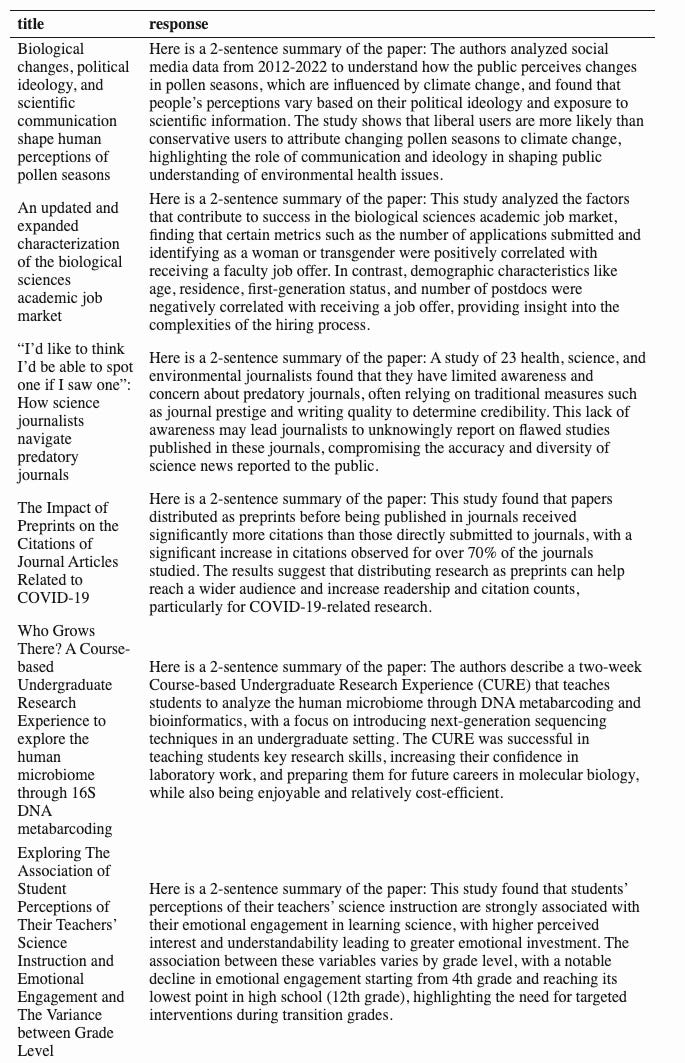
Now the response column in my new table has all the responses from the LLM. I can now put the title and summary in a table and render it with pandoc.


summarized |> 
  select(title, response) |> 
  mutate(response=gsub("\n", " ", response)) |> 
  knitr::kable()
Tuesday, July 30, 2024

Moving to blog.stephenturner.us (Paired Ends)

My new blog/newsletter ("Paired Ends") is now at blog.stephenturner.us. I'll be posting semi-regular updates and literature highlights in bioinformatics, computational biology, and data science, along with the occasional post on programming. Head over to blog.stephenturner.us to subscribe by email, or add the RSS feed to your favorite reader app.

Wednesday, February 1, 2017

Staying Current in Bioinformatics & Genomics: 2017 Edition

A while back I wrote this post about how I stay current in bioinformatics & genomics. That was nearly five years ago. A lot has changed since then. A few links are dead. Some of the blogs or Twitter accounts I mentioned have shifted focus or haven’t been updated in years (guilty as charged). The way we consume media has evolved — Google thought they could kill off RSS (long live RSS!), there are many new literature alert services, preprints have really taken off in this field, and many more scientists are engaging via social media than before.
People still frequently ask me how I stay current and keep a finger on the pulse of the field. I’m not claiming to be able to do this well — that’s a near-impossible task for anyone. Five years later and I still run our bioinformatics core, and I’m still mostly focused on applied methodology and study design rather than any particular phenotype, model system, disease, or specific method. It helps me to know that transcript-level estimates improve gene-level inferences from RNA-seq data, and that there’s software to help me do this, but the details underlying kmer shredding vs pseudoalignment to a transcriptome de Bruijn graph aren’t as important to me as knowing that there’s a software implementation that’s well documented, actively supported, and performs well in fair benchmarks. As such, most of what I pay attention to is applied/methods-focused.
What follows is a scattershot, noncomprensive guide to the people, blogs, news outlets, journals, and aggregators that I lean on in an attempt to stay on top of things. I’ve inevitably omitted some key resources, so please don’t be offended if you don’t see your name/blog/Twitter/etc. listed here (drop a link in the comments!). Whatever I write here now will be out of date in no time, so I’ll try to write an update post every year instead of every five.

Twitter

In the 2012 post I ended with Twitter, but I have to lead with it this time. Twitter is probably my most valuable resource for learning about the bleeding-edge developments in genomics & bioinformatics. It’s great for learning what’s new and contributing to the dialogue in your field, but only when used effectively.
I aggressively prune the list of people I follow to keep what I see relevant and engaging. I can tolerate an occasional digression into politics, posting pictures of you drinking with colleagues at a conference, or self-congratulatory announcements. But once these off-topic Tweets become the norm, I unfollow. I also rely on the built-in list feature. I follow a few hundred people, but I only add a select few dozen to a “notjunk” list that I look at when I’m short on time. Folks in this list don’t Tweet too often and have a high signal-to-noise ratio (as far as what I’m interested in reading). If I don’t get a chance to catch up on my entire timeline, I can at least breeze through recent Tweets from folks on this list.
I’m also wary of following extremely prolific users. For example — if someone’s been on Twitter less than a year, already has 20,000 Tweets, but only 100 followers, it tells me they’ve got a lot to say but nobody cares. I let the hive mind work for me in this case, using this Tweet-to-follower ratio as sort of a proxy for signal-to-noise.
I mostly follow individuals and aggregators, but I also follow a few organization accounts. These can be a mixed bag. Only a few organization accounts do this well, delivering interesting and applicable content to a targeted audience, while many more are poor attempts at marketing and self-promotion while not offering any substantive value or interesting content.
Individuals: In no particular order, here’s an incomplete list of people who Tweet content that I find consistently on-topic and interesting.
Others: Besides individual accounts, there are also a number of aggregators and organizations that I keep on a high signal-to-noise list.

Blogs

I follow these and other blogs using RSS. I’ve been happy with the free version of Feedly ever since Google Reader was killed. The web interface and iOS app have everything I need, and they both integrate nicely with other services like Evernote, Instapaper, Buffer, Twitter, etc. If you can’t find a direct link to the blog’s RSS feed, you can usually type the name of the blog into Feedly’s search bar and it’ll find it for you. Similar to my “notjunk” list in Twitter, I have a Favorites category in Feedly where I include only the feeds I absolutely wouldn’t want to miss.
These are some of the few that I try to read whenever something new is posted, and Feedly helps me keep those organized, either by “starring” something I want to come back to, or saving it for later with Instapaper. They’re in no particular order, and I’m sure I’ve forgotten something.
  • Variance Explained: David Robinson’s blog (Data Scientist at Stack Overflow, works in R and Python).
  • Global Biodefense: News on pathogens, outbreaks, and preparedness, with periodic posts on genomics and bioinformatics-related developments and funding opportunities.
  • In between lines of code: Lex Nederbragt’s blog on biology, sequencing, bioinformatics, …
  • Simply Statistics: A statistics blog by Rafa Irizarry, Roger Peng, and Jeff Leek.
  • Bits of DNA: Reviews and commentary on computational biology by Lior Pachter (fair warning: dialogue here can get a bit heated!).
  • Blue Collar Bioinformatics: articles related tool validation and the open source bioinformatics community.
  • Microbiome Digest - Bik’s Picks: A daily digest of scientific microbiome papers, by Elisabeth Bik, Science Editor at uBiome.
  • Living in an Ivory Basement: Titus Brown’s blog on metagenomics, open science, testing, reproducibility, and programming.
  • Enseqlopedia: James Hadfield’s blog on all things NGS.
  • Epistasis Blog: Jason Moore’s computational biology blog.
  • RStudio Blog: announcements about new RStudio functionality, updates about the tidyverse, and more.
  • nextgenseek.com: Next-Gen Sequencing Blog covering new developments in NGS data & analysis.
  • RNA-Seq Blog: Transcriptome Research & Industry News.
  • The Allium: We all need a little humor in our lives. Like The Onion, but for science.

Others

I’m unsure how to categorize the rest. These are things like aggregators, Q&A sites/forums, and others.
  • Nuzzel is something I’ve only been using for a few months but it works very well. It’s meant to solve the Twitter / social media overload problem. If you’re following a few hundred people, you could easily have thousands of Tweets per day to read through (or miss). Nuzzel emails you a daily newsletter of the most relevant content in your Twitter feed. I’m guessing it does this by analyzing how many people you follow share, retweet, or favorite the same links. I try to read everything in my RSS feeds but I could never do this with Twitter (nor should you worry about trying). Nuzzel helps you catch up on things that are trending among the people you follow. It’s not a substitute for following the right people (see the Twitter section above).
  • RWeekly: weekly updates from the entire R community. Offers an RSS feed but I subscribe to the weekly email. Each email sends out about 50 links with one-sentence descriptions to things being done in the R community that week.
  • R Bloggers aggregates RSS feeds from hundreds of blogs about R. Much more comprehensive than RWeekly, but lots to sort through.
  • GenomeWeb still provides high-quality original content as well as summaries of what’s going on in the field. Create an account, log in, view your profile page, and subscribe to some of their regular emails. I subscribe to their daily news, the scan, informatics, sequencing, and infectious diseases bulletins. Pro tip: Much of their content is only available for premium subscribers. If you sign up with a .edu address, you can access all this content for free.
  • F1000’s Smart Search is one of the few literature recommendation services that I find useful, relevant, and current. My RNA-seq and metagenomics alerts consistently deliver relevant and fresh content.
  • BioStars: This is a stack exchange Q&A site focused on bioinformatics, computational genomics, biological data analysis. You can go to the homepage and sort by topic, views, answers, etc., and the platform offers several granular ways to subscribe via RSS.
  • Bioconductor Support: This is a Q&A site much like BioStars that replaced the Bioconductor mailing list. You can do things like limit to a certain time period and sort by views, for example, if you only want to log in occasionally to see what’s being talked about.
  • SEQanswers: I subscribe to all new threads in the SEQanswers bioinformatics forum, and regularly browse post titles. When something sparks my interest, I’ll click into that post and subscribe to future updates on that post via email.
  • Google Scholar lets you search and create email alerts.
  • PubMed Alerts: You can save, automate, and have search results emailed to you through your MyNCBI account. Surprisingly, these seem to be more relevant than the Google Scholar searches for the terms that I use.
  • PubMed Trending - I have no idea how PubMed ranks these. It seemed to be more useful in the past, but now it seems that the top “trending” articles alternate between CRISPR/Cas9, and old kinesiology / sports medicine articles.
  • IFTTT: If This Then That is a service that connects many different web services together in an endless number of ways. At home I might connect Facebook and Dropbox, so that whenever someone tags me in a photo, that photo is automatically downloaded to my Dropbox. At work I can connect an RSS feed to an Evernote note or Google Doc. It’s useful is so many ways, both for personal and for work-related tasks. I mostly use it here as a last safeguard so that things I really shouldn’t miss don’t slip through the cracks. I have recipes that do things like email me if certain low-volume Twitter accounts post a new Tweet, others that automatically save to Instapaper things like starred articles in Feedly. I also use this to keep a close eye on a few accounts on GitHub. I have connections set up for a few users on GitHub so that whenever one of these users creates a new public repository, I get an email. I’ve also used IFTTT to archive Tweets coming out of various hashtags — you can create a recipe where if a new Tweet contains certain keywords or hashtags, then save that Tweet to Evernote, a shared Google Doc spreadsheet, etc. Zapier is a similar service that I’ve heard provides more granular control, but I haven’t tried it.
  • Podcasts: I listen to every episode of Roger Peng and Hilary Parker’s Not So Standard Deviations data science podcast, and most episodes of Roger Peng and Elizabeth Matsui’s The Effort Report (this one’s more about life in academia in general). I use the Overcast iOS app to listen to these and other podcasts on ~1.75X speed. (When I met Hilary at the RStudio Conference I heard her speak for the first time at regular 1X speed. Odd experience.) Finally, I just learned about the R podcast. I haven’t listened to much yet, but I’ve added it to my long Overcast queue.

Preprints!

Preprints in life sciences were nearly unheard of when I wrote the 2012 post. Now everybody’s doing it. There are still a few people using the arXiv Quantitative biology channel, and I’ll occasionally find something in PeerJ Preprints that grabs my attention.
bioRxiv is the biggest player here, hands down. The Alerts/RSS page lets you sign up for email alerts on particular topics, or subscribe to RSS feeds coming from particular categories that interest you. I subscribe to the Genomics and Bioinformatics feeds. I also follow several of the bioRxiv’s top-level and category Twitter feeds @biorxivpreprint, @biorxiv_bioinfo, and @biorxiv_genomic).
F1000 Research deserves some special attention here. It’s somewhere in-between a preprint server and a peer-reviewed publication. You can upload manuscripts (or other research outputs like posters or slides), and they’re immediately and permanently published, and given a DOI. Then one or more rounds of open peer review as well as public comment take place, and authors can update the published paper for further review. Check out the transcript estimates / gene inference paper I mentioned earlier. You’ll see it’s “version 2,” and was approved by two referees. If you look at the right-hand panel, you can actually go back and see the prior to revision, as well as see who reviewed it, what the reviewer wrote, and how the authors responded to those reviews. It’s an innovative platform where peer review is open and transparent, and is independent of publication, since papers are published before they are reviewed, and remain regardless of the outcome of the review. F1000 Research has a number of channels that are externally curated by different organizations, societies, conferences, etc. I subscribe to and get alerts about the R package and Bioconductor channels. Whenever a new preprint is dropped into one of these channels, I’ll get an email and an RSS item.
I only recently discovered PrePubMed, which looks very useful. PrePubMed indexes preprints from arXiv q-bio, PeerJ Preprints, bioRxiv, F1000Research, preprints.org, The Winnower, Nature Precedings, and Wellcome Open Research. In the tools box on the homepage, you can enter a search string and get back an RSS feed with results from that search. It looks like PrePubMed is maintained by a single person, but he’s made the entire thing open source, so you could presumably set this up and mirror it on your own, should you check back in 2021 and the link be dead.

Journals

I started with Journals in my 2012 post, but they’re last (and probably least) here. I still subscribe to a few journals’ RSS feeds, but in most cases, by the time I see a new Table of Contents hit my RSS reader, I probably saw the publications making the rounds on Twitter, blogs, or other channels mentioned above. It’s also no longer unusual to see a “publication” land where I read the preprint on biorXiv months ago, and perhaps even a blog post before that! What “publication” means is changing rapidly, and I’m sure the lines between a blog post, preprint, and journal article will be even blurrier in the year 2022 post.

How do you have the time to do this?

How do you not? It’s not as bad as it seems. I probably spend an hour each weekday scanning all the resources mentioned here, and I find the time well spent. I can breeze through my Twitter and RSS feeds on my bus ride into work, and saving things I actually want to look at later with a bookmark, star, favorite, Instapaper, etc.
I should have prefaced this whole article with the note that I hardly ever actually fully read any of the papers or blog posts I see here. If I see, for example, a new WGS variant caller published, I’ll glance at the figures benchmarking it against GATK and FreeBayes, and skim through the documentation on the GitHub README or BioConductor vignette. If either of these is missing or falls short, that’s usually enough for me to ignore the publication completely (don’t underestimate the importance of good documentation!).
It’s taken me a decade to compile and continually hone this list of resources to the things that I find useful and relevant. This is what works for me, now, in 2017. It’s not a one-size-fits-all, and the 2018-me will probably have a somewhat different list, but I hope you’ll find it useful. If your interests are similar to what I’ve discussed here, how do you stay current? What have I left out? Let me know in the comments!
Creative Commons License
Getting Genetics Done by Stephen Turner is licensed under a Creative Commons Attribution-NonCommercial 3.0 Unported License.